How can we help?
Everything about evaluations, rules, payouts and the platform — clear answers with real examples. Can't find it? Open the chat bubble at the bottom-right and our team will help.
Video tutorials
Buy a plan, the 2x1, the 3x1 presale and R|Trader Pro, step by step.
Getting started
What Voltra is, how funding works, and your first steps.
Rules & evaluation
Profit target, trailing drawdown, daily loss, consistency and contracts.
Payouts & KYC
Requesting payouts, re-eligibility, the profit split and verification.
Platform
Connect TradingView, Rithmic or Ironbeam, markets and order types.
Partner Program
Get approved, promote Voltra and earn a growing commission.
Live Program
How promotion to Live works, account rules, contract limits and withdrawals.
Restricted countries
Where Voltra cannot offer its services.
No VPS or servers
Buy and trade from your own internet, not from a VPS.
Trading halts & price limits
Be flat before a halt or a price limit. Holding through one fails the account.
Video tutorials
Getting started
What is Voltra and how does it work?
Voltra is a simulated futures trading firm. You purchase an evaluation on a simulated account, and your goal is to reach a profit target while respecting the risk rules (maximum drawdown and daily loss limit). When you complete the evaluation, your account becomes a simulated funded account that is eligible for payouts.
All trading takes place on simulated funded accounts, not on live market money. Payouts are based on the performance you achieve under the published program rules.
Which account sizes can I choose?
Voltra offers several evaluation sizes so you can pick the one that matches your style and budget — typically 25K, 50K, 100K and 150K. Each size has its own profit target, maximum drawdown, daily loss limit and contract limits.
You can see the exact numbers for every plan on the Pricing page before you buy.
Do I need experience to start?
No prior experience is required to purchase an evaluation and start trading with TradingView or the Ironbeam web platform. That said, futures trading carries risk even in simulation, so we strongly recommend understanding the core rules first — the profit target, the trailing drawdown and the daily loss limit — so you don't lose an account to a rule you didn't know about.
Is there a time limit to pass the evaluation?
Yes. Each evaluation is a one-time payment and is valid for 30 days from purchase (a paid reset starts a new 30-day period). Within that time you need to meet the minimum trading days (as low as 1 on some plans) and reach the profit target while staying within the risk rules. Your dashboard shows the days left and we email you 5 days before it expires. If it is not passed by then, the account is closed after the market closes. There are no monthly charges.
How soon can I trade after buying?
Your account is created immediately after purchase and your connection details are emailed to you. Connect TradingView or the Ironbeam web platform (see the step-by-step guides in the Platform section) and you can start trading right away during market hours. If the market is closed, your orders will be available when the session reopens.
Rules & evaluation
What is the profit target?
The profit target is the amount of simulated profit you need to reach to pass the evaluation. It is fixed per plan (for example, a 50K account may target roughly 6% of the account balance). Your live progress toward the target is shown on your account page, so you always know how much more you need.
What is the maximum drawdown?
The maximum drawdown is a trailing loss limit that follows your highest balance. As your account grows, the floor rises with it; once it reaches your starting balance it locks there and stops trailing. If your equity — including open positions — falls below the floor, the account is closed.
Illustrative 50K account with a $2,000 max drawdown.
| Highest balance reached | Loss floor | What happens |
|---|---|---|
| $50,000 (start) | $48,000 | start − $2,000 |
| $51,000 | $49,000 | floor trails up with you |
| $52,000 | $50,000 | locks at breakeven — your starting balance |
| $55,000 | $50,000 | stays at breakeven, never higher |
Your account page shows your live "drawdown remaining" so you can manage risk in real time.
What is the daily loss limit?
The daily loss limit caps how much you can lose in a single trading day, measured from the day's starting balance. If you reach that cap, your open positions are closed and trading is locked for the rest of that day — but your account is not closed or failed. Trading reopens automatically at the next session (6:00 PM ET) and you continue with the balance you have left. The limit resets each new trading day, so a fresh day always starts with the full allowance.
How many minimum trading days do I need?
Each plan has a minimum number of days on which you must place at least one trade before the evaluation can pass — on some plans this is as low as 1 day. This prevents an account from passing on a single lucky trade and encourages consistent activity.
What is the consistency rule?
On plans with consistency enabled, no single trading day may account for more than the published percentage of your total profit — commonly 50%. This keeps results steady rather than dependent on one lucky day.
Your dashboard tells you exactly how much more profit you need to satisfy the rule.
Is copy trading allowed?
Yes — you may copy trade across your own accounts. If you personally manage more than one Voltra account and mirror your own strategy across them, that is allowed.
What is not allowed is copying or mirroring trades between different users' accounts, or any coordinated or group trading across accounts that belong to different people. This is treated as collusion, breaches the Funded Account Agreement, and can lead to the accounts being suspended and the profits and payouts voided.
In short: your own strategy on your own accounts is fine; copying to or from other people's accounts is not.
What is the maximum contract size?
Each plan limits how many contracts you can hold at once, split into micros and minis (for example, 40 micros or 4 minis). Any order that would push you over your limit is blocked automatically, so you can't accidentally breach it. Larger account sizes allow larger positions.
What happens if I break a rule? Can I reset?
These two rules work differently. If you hit the daily loss limit, trading just pauses for the rest of that day and reopens next session — the account is not lost. If you breach the maximum drawdown, that ends the evaluation and the account is marked as blown. In that case you do not have to buy a new evaluation — you can reset the account to a fresh evaluation from your account page and start again from the initial balance.
How many funded accounts can I have at the same time?
You can hold up to 5 active funded accounts at once. You can pass as many evaluations as you like, but only 5 funded accounts trade at a time.
If you pass another evaluation while you already have 5 funded accounts, the new one goes into a waiting list (shown as "Standby" on your dashboard). As soon as one of your 5 funded accounts becomes ineligible or is closed, the account that has been waiting the longest is automatically promoted to funded and starts trading — you don't have to do anything.
Which trading practices are prohibited?
To keep the program fair, the following are not allowed:
- Hedging or opening opposite positions across accounts (yours or others').
- Collusion, group trading or account-sharing.
- Martingale and excessive grid / averaging-down strategies.
- Exploiting price latency, feed errors or news spikes.
Our review engine flags these patterns. Confirmed abuse can close the account without payout. The full list is in the Trader Agreement and Program Rules.
Payouts & KYC
How do I request a payout?
From an eligible simulated funded account, open the Withdrawals page, choose the amount and your payout method, and submit the request. Every request is checked against the published payout rules — verified identity, signed agreements, minimum profit, day requirements and the profit buffer — and paid once approved.
The Withdrawals page shows a checklist of exactly what you still need before a request can go through, so nothing is a surprise.
How can I get paid — Stripe, PayPal or Wise?
You choose. Stripe sends your payout to your bank; Stripe collects your tax form (W-9 / W-8BEN) when you connect. PayPal sends it to the PayPal email you save on the Withdrawals page. Wise sends it to the email you save for Wise on the Withdrawals page: if that email has a Wise account the money lands in your Wise balance, and if not, Wise emails you to add your bank account (you don't need to open a Wise account). With PayPal or Wise you sign your tax form (W-9 if you live in the US, W-8BEN otherwise) on your Tax form page in Voltra. Identity verification (KYC) is required with every method, and the account that receives the money must be in your own legal name.
How do I get paid with Wise? (step by step)
1. Verify your identity (KYC) and sign your Funded Account Agreement.
2. Sign your tax form (W-9 or W-8BEN) on your Tax form page.
3. On the Withdrawals page, find Get paid with Wise, type the email where you want to receive the money and press Save. Use the email of your Wise account if you have one; any email in your own name works.
4. Request your payout and choose Wise as the method.
5. Once your payout is approved and sent, Wise emails you. If you have a Wise account with that email, the money arrives in your Wise balance. If you don't, follow the link in the email from Wise and enter your bank details; Wise deposits it to your bank.
Payouts through Wise are sent in US dollars. Wise and PayPal charge their own fees, which are deducted from the amount sent and are paid by you (Terms, section 6.3). While a Wise payout is in progress you can't change your Wise email, to keep your payment safe. Always check that the email comes from Wise before entering any bank details.
Which payment methods do you accept?
Card through our secure checkout, or PayPal (your PayPal balance, or the bank or card linked to your PayPal). Paying with PayPal and have a discount code? Type it in the discount box right before tapping Pay with PayPal.
Why do I need identity verification (KYC)?
KYC (Know Your Customer) verification protects both you and the firm against fraud and ensures payouts go to the right person. You must be verified before your first payout. Submit your documents from your Profile page; verification is usually approved quickly.
How much of the profit do I keep?
Funded traders keep up to 80% of the profit they generate on the simulated funded account, with the exact split shown on your plan. The remaining share stays with the firm.
How often can I request a payout?
Payouts unlock after a minimum number of qualifying trading days on your funded account, and then follow a set cadence — for example, once every 5 days. Your account page always shows the date your next payout becomes available.
When can I withdraw again after a payout?
After your first payout, you can withdraw again only once you are profitable since that payout — your balance has to climb back above the balance left right after your most recent withdrawal.
Illustrative 50K account (start $50,000). Real per-request caps depend on your plan and are shown on your Withdrawals page.
| Step | Balance | Can you withdraw? |
|---|---|---|
| 1st payout | $56,000 | ✔ Yes — first payout, no requirement |
| ↳ leaves the account at | $54,000 | floor to beat → $54,000 |
| 2nd payout | $55,500 (up from $54,000) | ✔ Yes — profitable since last |
| ↳ leaves the account at | $53,000 | floor to beat → $53,000 |
| 3rd payout | $52,400 (down from $53,000) | ✗ Not yet — keep trading to pass $53,000 |
Your Withdrawals page always shows whether you are eligible and the exact figure you need to reach.
How does a payout affect my loss limit?
When a payout is paid, your balance drops by that amount and your loss limit (the loss floor) moves to breakeven — your account's starting balance — and stays capped there, never higher.
| Before payout | You withdraw | Loss floor after |
|---|---|---|
| $54,000 (50K account) | $2,000 | $50,000 — breakeven, capped |
It never moves above your starting balance. After you take profits, your margin protects your initial capital.
Is there a minimum or maximum payout?
Yes. Each plan has a minimum payout amount and a maximum per request, plus a small profit buffer that must remain in the account after the payout. These figures are shown directly on the Withdrawals page so you can plan your request.
How long does it take to get paid?
Once your request passes review it is scheduled for payment through the method you selected. Processing times depend on the method, but approved payouts are handled promptly. You can follow the status of each request in your Withdrawals history.
Platform — how to connect & trade
Trade from your dashboard: the Voltra Terminal
The Voltra Terminal (VOLTRA X) lets you trade your Ironbeam or Rithmic accounts directly from your Voltra dashboard — chart, DOM, one-click orders, stop loss, take profit and your account numbers in one screen. Open it from VOLTRA X in the left menu or the ⚡ VOLTRA X button on your dashboard.
Your stop loss and take profit are placed at Ironbeam and attached to your position, so they keep working even if you close the browser. When one is filled, Ironbeam cancels the other automatically. Drag the SL and TP lines on the chart to move them.
Write the distance in points and turn the trailing stop ON while you have a position open. It is sent to Ironbeam as a trailing stop, so Ironbeam moves it on its servers as price goes your way — even with the browser closed. The positions table shows (trail) next to a trailing stop.
RP&L is your realized profit/loss of the day (changes only when a trade closes). UP&L is the floating profit/loss of open positions. Bal is your Ironbeam cash balance. Open positions, with their stop loss and take profit, are listed below the chart.
How to trade: connect TradingView (recommended)
TradingView is the recommended way to trade your account: clean charts and one-click execution, connected to your Ironbeam account. You only need to connect it once.
| Broker | Ironbeam |
| Environment | Demo |
| Username | Your account number (e.g. VOLTRA51425056-1) — exactly as is, including the -1 at the end |
| Password | The one emailed to you when your account was created |
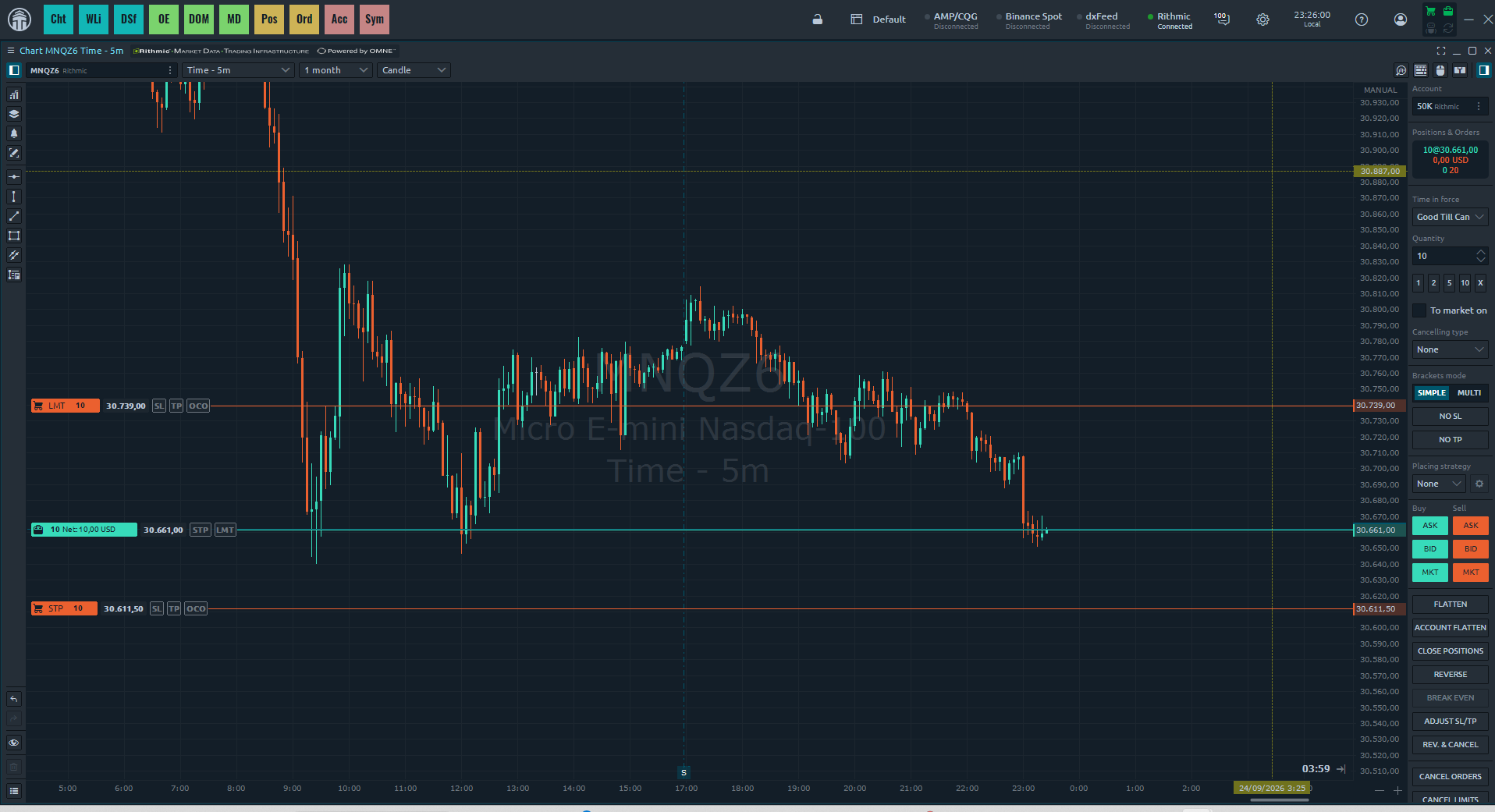
How to trade: connect Quantower with Rithmic (recommended)
Quantower is a fast, modern platform that connects directly to Rithmic — no extra approvals needed. It's our recommended option right now. You connect with the same credentials we email you (System Rithmic Paper Trading).
| Connection | Rithmic |
| Server | Rithmic Paper Trading (Paper Chicago) |
| User Name | The User Id emailed to you (e.g. VLTRU000123) |
| Password | The one emailed to you when your account was created |
How to trade: connect R|Trader Pro with Rithmic
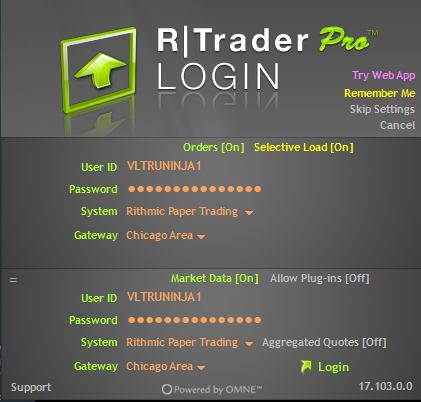
R|Trader Pro is Rithmic's own platform. Download it from rithmic.com (desktop) or use the web version. Then sign in with the credentials we emailed you (also in your dashboard under Credentials). Your first login must be in R|Trader Pro, even if you plan to trade on Quantower or another platform, so you can sign the market-data agreements.
Rithmic: which platforms can I use & the market-data agreements
With a Rithmic account you can trade on any Rithmic-compatible platform. The login is the same everywhere (System Rithmic Paper Trading + your User Id + password).
The first time you log in, Rithmic shows 2 market-data agreements you must sign to enter. This is a standard Rithmic/exchange requirement, not a Voltra charge. Read and accept both, and when asked for your status choose Non-Professional (typical for individual traders). You only do this once.
How to trade: Ironbeam web platform
You can also trade directly on the Ironbeam web platform. Here the login is different: you use your email as the username (not the account number).
| Page | ironbeam.com/app |
| Username | Your email address |
| Password | The same one emailed to you |
Which markets can I trade?
Voltra offers popular futures across indices, metals, energy, FX and agricultures — including the micro E-mini Nasdaq (MNQ), micro E-mini S&P (MES), micro Gold (MGC) and micro Crude Oil (MCL). The full list of approved products and their commission per side is available in the Platform section of the Help Center.
What order types can I use?
You can use market, limit and stop orders, and attach a stop-loss and take-profit to any position. On TradingView you place them from the Trading Panel or directly from the chart; on the Ironbeam web platform you use its order ticket. Your contract limit for the plan is enforced automatically, so an order that would exceed it is blocked.
Where do I see my balance and statistics?
Your Dashboard shows your live balance, your loss floor (Max Loss) and your live profit-and-loss. Each account also has a Statistics page with win rate, profit factor, average win and loss, and your cumulative P&L curve — so you can review your performance and improve.
Partner Program
What is the Voltra Partner Program?
It is our official affiliate program for creators, educators and trading communities. Approved partners get a unique referral link and earn a commission on every evaluation their audience purchases. It is application-only — not every account can become a partner; you have to apply and be approved first.
How do I become a partner?
Open the Partner Program page from your menu and submit the application (your platforms, audience, and how you plan to promote Voltra). Our team reviews every application by hand and emails you a decision. We approve serious creators and communities — quality of audience matters more than size.
I was approved — what happens next?
You receive an approval email, then you open your Partner Program page and sign the Partner Agreement (you tick the box and type your full legal name). Your referral link, level ladder and earnings stay locked until you sign. This protects both sides and keeps promotion honest and compliant.
How is my commission rate decided?
Your rate is automatic and based on how much your referrals purchase during the current calendar month. The more volume you bring, the higher your tier:
| Level | Monthly referral volume | Commission |
|---|---|---|
| 🥉 Bronze | $0 – $4,999 | 5% |
| 🥈 Silver | $5,000 + | 8% |
| 🥇 Gold | $15,000 + | 12% |
| 💠 Platinum | $35,000 + | 16% |
| 💎 Diamond | $75,000 + | 20% |
Volume is the net amount Voltra actually collects from your referrals (after coupons and refunds).
Does my level reset each month?
Yes. On the 1st of every month your volume resets to $0 and your level restarts at Bronze (5%), so every month is a fresh climb. Commission you already earned in previous months keeps the rate it was earned at — the reset only affects your current level going forward.
How and when am I paid my commission?
Commissions are paid through Stripe, PayPal or Wise. With Stripe, connect your account on the Partner Program page — Stripe securely collects your bank and tax details (W-9 / W-8BEN). With PayPal or Wise, save your PayPal or Wise email on the Payouts page, sign your tax form (W-9 / W-8BEN) and verify your identity in Voltra. Once your balance owed reaches the $500 minimum, your commission is ready to be paid out. You are an independent contractor and responsible for your own taxes.
What are the rules for partners?
Promotion must be honest and compliant: no guaranteed-profit or income claims, no describing Voltra as real-money funding (all trading is simulated/evaluation), no spam, no bidding on Voltra brand terms, and no fake or misleading pages. You may not refer yourself or buy through your own link. Fraudulent, refunded or charged-back referrals are disqualified and their commission can be reversed. Full terms are in the Partner Agreement you sign.
Where do I find my link and stats?
Everything lives on the Partner Program page: your referral link, how many people you referred, how many challenges they bought, your current level and progress to the next one, and your earned / paid / owed commission.
Live Program
What is the Voltra Live program?
The Live program (Live Ultra) is the next step after a simulated funded account. When a trader is promoted to Live, they move from a simulated funded account to a real-capital account. Promotion is a discretionary decision of Voltra's management, based on the trader's trading history, withdrawal behavior and any other factor Voltra considers relevant.
When you are moved to Live, your previous platform accounts are locked and our team sends you the access details for your new Live account and the next steps.
How do I get promoted to the Live program?
Promotion is a decision of Voltra's management (Risk department); it is not something you request or earn automatically. There is no fixed number of withdrawals: you may be promoted before your first withdrawal, at your first withdrawal, or after any later one (for example the 10th or the 20th), or not at all.
When you are promoted, Voltra decides the capital and starting limits of your Live account. They are not calculated from how many funded accounts you have or their balances, and balances from several accounts are not combined. As Voltra reviews your performance on Live, it may add capital over time, but it is not obliged to.
Once selected, the evaluation and setup of your Live account typically takes between one (1) and fifteen (15) days.
Live account rules: drawdown, cushion and withdrawals
The figures below are the reference terms; Voltra may set different capital and limits when it promotes you. A Live account starts with a balance of USD 0.00 and uses an end-of-day (EOD) trailing maximum-loss limit (drawdown). The starting limit depends on the size of your original funded account and grows as you build profits. There is no cap on the profit you can make, even within a single day.
To unlock daily withdrawals you must first reach the base profit cushion for your account size. Once you reach it, your maximum-loss limit is fixed at USD 100 and daily withdrawals are enabled. The profit split on a Live account is 90% for the trader and 10% for Voltra.
Parameters by original funded account size (initial EOD drawdown / cushion for daily withdrawals / loss limit once the cushion is reached): 25K: USD 1,000 / USD 1,000 / USD 100. 50K: USD 2,000 / USD 2,000 / USD 100. 100K: USD 3,000 / USD 3,000 / USD 100. 150K: USD 4,500 / USD 4,500 / USD 100.
What are the trading conditions and contract limits on Live accounts?
Each Live account has a maximum position size (contract limit) that Voltra sets when the account is created. The limit can differ from one account to another, at the Risk department's discretion, and it is stated in each account's contract.
Take-profit orders, manual closing of positions, break-even and trailing stops are all allowed. Apart from the contract limit, Live accounts are meant to trade under normal market conditions.
What happens to my accounts when I move to Live?
All of your previous platform accounts are locked and can no longer be traded, on the platform or through any connected broker. If you open the terminal on a locked account you will see a message asking you to contact support. This is expected: our team will reach out with the access details for your new Live account. If you have questions in the meantime, reply to your welcome email or contact support.
Restricted countries
Because of international sanctions and financial regulations, Voltra does not offer its services to residents of, or persons located in, the jurisdictions below. Accounts opened from these locations may be closed and are not eligible for payouts. If you are unsure whether your country qualifies, contact support before purchasing an evaluation.
Identity documents (passports, national IDs, driver's licenses) issued by these jurisdictions are not accepted for identity verification, even if you live in another country. You must verify with a valid document issued by a country that is not on this list.
This list reflects jurisdictions subject to comprehensive sanctions or classified as high-risk, and may be updated at any time without notice.
No VPS or servers
For security, you cannot buy an evaluation, reset or activation, and you cannot use the VOLTRA X terminal, from a VPS (virtual private server), a cloud or datacenter server, a remote desktop service or Tor. If you try, you will see a message asking you to close the VPS. Connect from your own internet (home or mobile) and try again.
VPN connections may be reviewed by our team. Using a VPS, VPN or any tool to hide your real location — for example to get around the restricted countries — is not allowed and may lead to the suspension of your accounts (Terms and Conditions, section 23.1.11).
Español: por seguridad, no se puede comprar ni usar el terminal VOLTRA X desde un VPS, un servidor en la nube o de centro de datos, un escritorio remoto ni Tor. Conéctate desde tu propio internet (casa o celular). Las conexiones con VPN pueden ser revisadas. Usar un VPS o una VPN para ocultar desde dónde te conectas no está permitido.
Trading halts & price limits
The exchange (CME) has price limits for futures. For equity index futures (Nasdaq, S&P, Dow, Russell) there is a 7% limit overnight, and during the day the 7%, 13% and 20% levels, which can halt trading together with the stock market circuit breakers. Other products (metals, energy) have their own limits. See the current levels here: cmegroup.com/trading/price-limits.
The rule: you must be flat before a halt or a price limit is reached. If any of your accounts has an open position, or places, changes or fills an order, during a halt or while the price is at a limit, that account is failed and closed and all its profits, including pending payouts, are lost (Terms and Conditions, section 23.1.12). On very volatile days, trade smaller and use your stop loss — during a halt a stop may not fill at your price.
Español: la bolsa (CME) tiene topes de precio. En los futuros de índices (Nasdaq, S&P, Dow, Russell) hay un tope de 7% de noche y de día los niveles de 7%, 13% y 20%, que pueden detener la negociación. Debes cerrar tus posiciones antes de que el mercado se detenga o llegue al tope. Si una cuenta tiene una posición abierta, o pone, cambia o llena una orden, durante una pausa o con el precio en el tope, esa cuenta se pierde y se cierra, con todas sus ganancias (Términos, sección 23.1.12).

 Quantower
 Bookmap
 MotiveWave
 TradingView